

Description
Is your site available behind the Chinese Firewall? You can check using the Blocked in China API right from the comfort of your WordPress Dashboard.
✅ FREE MONTHLY STATUS CHECKS
Check once per month for free if your site is available from the Chinese mainland with the click of a button.
🧑🏻💻 ENSURE EVERYONE IN CHINA CAN ACCESS YOUR SITE
Multiple servers from different provinces test your site’s availability in China.
⏰ UPGRADE FOR WEEKLY, DAILY, OR HOURLY STATUS CHECKS
Because of API limitations and usage, you can upgrade to one of our paid plans to get Weekly, Daily, or Hourly status updates.
🗓 SCHEDULE STATUS CHECKS
Stay up to date with the latest status results by upgrading to a paid plan and scheduling automatic monthly, weekly, daily, or hourly status checks.
❌ DISABLE GOOGLE FONTS
Disable enqueuing of Google fonts throughout your entire site with the click of a button. Google fonts can slow down your site in China because they are not available.
📖 VIEW HISTORY LOG OF STATUS CHECKS
Keep a history of your status checks and easily view them under the Logs tab.
✅ PERFECT FOR:
- eCommerce stores selling to China.
- Agencies monitoring client site availability in mainland China.
- Global websites with Chinese traffic that need GFW visibility.
- Teams pairing uptime checks with speed and payment optimization for China.
🆘 TOP-NOTCH SUPPORT
Get red-carpet support from the Gaucho Plugins team. Just submit a ticket.
Roadmap:
- Email notifications about status results.
- In-depth analysis of your site to determine what files/code are being blocked.
- A map of your website’s status in each region in China.
- Check multiple 3rd party sources through our API instead of just one.
- Export your site’s status history.
- Display the latest status on the front-end.
- Check other sites and set status updates from the WP Admin Dashboard.
Feel free to contact our team to request other features.
⭐️ SAVE 35% WITH CHINA PLUGINS BUNDLE ⭐️
Like the plugins? China Plugins Bundle covers eCommerce, uptime, and speed optimization to ensure your China-based website visitors have the best possible experience on your website.
CHINA PAYMENTS PLUGIN
Easily accept WeChat Pay and Alipay payments from Chinese customers.
DOWNLOAD FREE | WEBSITE
BLOCKED IN CHINA
Check if your site is available from mainland China servers.
DOWNLOAD FREE | WEBSITE
SPEED IN CHINA
Run website speed tests from mainland China servers.
DOWNLOAD FREE | WEBSITE
GAUCHO PLUGINS PORTFOLIO
Payment Page: Start accepting payments in a beautiful payment form in less than 60 seconds
Split Pay Plugin: Split WooCommerce payments across multiple connected Stripe accounts.
Login for Stripe Customer Portal: Create an Account login area for your Stripe customers.
Gyta Buyback: Create a trade-in / buyback business using WooCommerce.
Version Info: Show WP, PHP, MySQL & Web Server Versions in the WP-Admin Dashboard.
China Payments Plugin: Accept WeChat Pay and Alipay payments from Chinese customers.
Blocked in China: Check if your website is available in the Chinese mainland.
Speed in China: Check your website’s speed in the Chinese mainland.
External Services
This plugin connects to the following external services when you run a status check or when the plugin checks for updates and notifications.
Blocked in China API (api.blockedinchinaplugin.com)
This plugin sends your public site URL to our backend API to check availability from mainland China probe servers. Status check results are stored in your WordPress site. We use third-party probe sources (including viewdns.info) depending on server availability at the time of the check.
Freemius (api.freemius.com, freemius.com)
This plugin includes the Freemius SDK for license and update management. Data is sent to Freemius when you opt in through the Freemius connect screen.
Screenshots

Plugin Settings 
Status Check Results 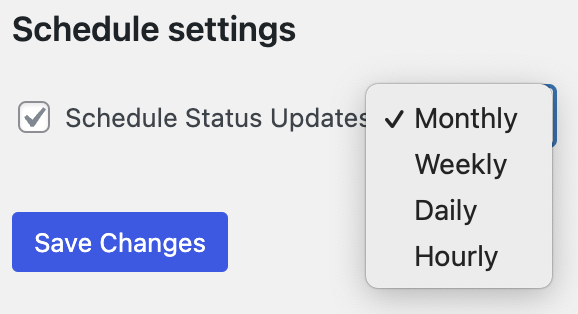
Schedule Settings 
Latest Status on WP Admin Bar
Installation
- Download the plugin
- Upload the .zip file to your WordPress Dashboard.
- Click Activate.
- You will be redirected to the settings area, where you can run your first status check.
FAQ
-
How does the Blocked in China API work?
-
The Blocked in China API uses multiple servers to check your site’s status from within China, depending on the current server usage at the time. The primary API we’re currently using comes from viewdns.info.
-
Where are the servers located?
-
Servers are currently available in 5 regions, including Beijing, Shenzhen, Inner Mongolia, Heilongjiang Province, and Yunnan Province.
-
Why do I need to check my site’s availability in China?
-
Internet usage is restricted in China. Many websites are not able to be accessed due to government limitations.
-
How can I guarantee my site is available in China?
-
While there is no way to guarantee your site will always be available in China, you can register with the Chinese Ministry of Industry and Information Technology for an ICP license. This requires that your website is hosted in China. While it is not required to have an ICP license to ensure your site can be visited from China, it can help assure that your site will be available because all requirements are met for your website.
-
Does my website have to be hosted in China to be available in China?
-
No. Your website can be hosted anywhere in the world. As long as the server or URL has not been blocked by the Chinese Ministry of Industry and Information Technology, then your site will be available in the mainland.
-
Yes — they are complementary plugins. Blocked in China checks whether your site is reachable from mainland China. Speed in China measures load performance and helps optimize resources for Chinese visitors.
-
How is this different from disabling Google Fonts in this plugin vs Speed in China?
-
Blocked in China can disable Google Fonts enqueuing site-wide with one click. Speed in China can localize and serve Google Fonts locally for Chinese visitors. Many sites use both plugins together.
-
What do the paid plan tiers include?
-
Free includes monthly status checks. Paid plans unlock more frequent checks (weekly, daily, or hourly) and scheduled automatic status checks. See plans and pricing.
-
Does the plugin store my status check history?
-
Yes. Status check results are stored in your WordPress site and are viewable under the Logs tab in the plugin settings.
Reviews


Contributors & Developers
“Blocked in China | Check if your site is available in the Chinese mainland” is open source software. The following people have contributed to this plugin.
Contributors


“Blocked in China | Check if your site is available in the Chinese mainland” has been translated into 11 locales. Thank you to the translators for their contributions.
Interested in development?
Browse the code, check out the SVN repository, or subscribe to the development log by RSS.
Changelog
1.1.6
- API endpoint migrated to api.blockedinchinaplugin.com. The api.blockedinchina.io domain continues to work for existing installs — no action required.
- Added
GPBIC_API_BASEconstant andgpbic_api_basefilter so hosts and agencies can override the backend URL per-environment without forking. - Reduced outbound API call frequency: monthly cache for the latest-key endpoint, 12-hour cache for feature definitions, 1-hour cache for admin notifications, plus a 5-minute circuit breaker that prevents hammer-loops when the backend is degraded.
gpbic_api_cache_bypassfilter available for debugging. - Updated bundled Freemius SDK to v2.13.1 (multisite opt-in fix, sync-cron race fix, bulk-update notice fix, PHP 8.5 deprecation warning resolved, ABSPATH guards).
- WP 7.0 compatibility: defer textdomain load to
initaction and bump minimum PHP to 7.4.
1.1.5
- UI improvements and other bug fixes.
See our full changelog in our documentation.